
Download Spiceworks – IT Support, IT Management, IT Community
Overview
Spiceworks is a comprehensive desktop application designed for IT professionals seeking a centralized hub for managing their day-to-day responsibilities. The software serves as a dynamic platform where IT teams can collaborate, troubleshoot issues, and access a wealth of technical resources. It enables users to ask questions, receive real-time answers from peers and vendor experts, and explore product reviews and recommendations. The platform fosters an active IT community, encouraging discussions on technical challenges, best practices, and even lighthearted moments related to common IT frustrations like password resets.
Targeted at IT support staff, system administrators, and IT managers, Spiceworks streamlines access to essential tools and knowledge. It supports real-world workflows such as diagnosing network issues, comparing software solutions, and sourcing vendor deals. The application is accessible across multiple platforms, allowing users to stay connected regardless of their device. While the developer did not provide additional background details, the software’s reputation in the IT sector is well-established, with a strong focus on peer-driven support and community engagement.
Key Features & Capabilities
- IT Help Desk Integration – Enables IT teams to manage support tickets and track issue resolution through a shared platform.
- Community Forum Access – Offers a space for IT professionals to post questions, share solutions, and engage in technical discussions.
- Product Reviews & Recommendations – Provides verified insights from fellow IT pros and vendor experts on software and hardware tools.
- Vendor Deals & Price Quotes – Allows users to connect with tech vendors to obtain competitive pricing and special offers.
- IT Knowledge Base – Houses a growing collection of articles, guides, and troubleshooting steps for common IT challenges.
These features are designed to enhance productivity by reducing downtime and accelerating problem resolution. For example, an IT administrator can quickly search for solutions to a recurring network issue, compare multiple firewall products using community feedback, or request a quote from a vendor—all within the same interface. The integration of community-driven insights ensures that users benefit from real-world experiences, not just theoretical documentation.
User Interface, Workflow & Performance
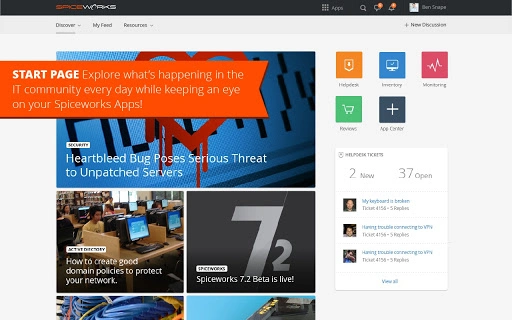
The user interface of Spiceworks is structured to prioritize accessibility and efficiency. Navigation is organized through clearly labeled tabs and menus, allowing users to switch between the forum, knowledge base, vendor marketplace, and personal dashboard with minimal effort. The layout supports a streamlined workflow, enabling users to post questions, follow discussions, and manage their contributions without unnecessary steps.
While specific performance metrics were not provided, the application is designed for consistent responsiveness across devices. The developer did not specify resource usage details, but the 50 MB installation size suggests a lightweight footprint. Stability is expected to be high given the platform’s long-standing presence in the IT community. Users can expect smooth navigation and reliable access to content, with no reported issues related to crashes or freezes in the available documentation.
Compatibility & System Requirements
Spiceworks is compatible with Windows, Mac, Linux, Android, and iOS operating systems, making it accessible to a broad range of IT professionals regardless of their preferred device. The software version is 1.0, with a file size of 50 MB, indicating a compact installation package. This cross-platform availability ensures users can stay connected and productive whether they are in the office, on the road, or working remotely.
Exact system requirements were not listed. Compatibility information was partially provided, with no specific mention of CPU, RAM, or storage needs. The developer did not specify minimum hardware specifications, so users should ensure their device meets general standards for running desktop applications. The application is designed to function on modern systems across all supported platforms.
Pros and Cons
Pros
- Free access to a large community of IT professionals and vendor experts
- Comprehensive IT knowledge base with real-world solutions
- Integrated vendor deals and price quotes for tech purchases
- Supports multiple platforms including desktop and mobile devices
- Encourages collaboration through forums and discussion threads
Cons
- No detailed system requirements were provided
- Performance behavior under heavy use was not specified
- Resource usage (CPU/RAM) is unknown
- Interface may feel cluttered for users seeking minimalistic design
- Requires internet connection for full functionality
FAQ Section
Is Spiceworks available for free?
Yes, Spiceworks is offered at no cost to users. It is designed to support IT professionals by providing free access to community discussions, product reviews, and vendor deals.
Can I use Spiceworks offline?
Spiceworks requires an internet connection to access community forums, vendor resources, and real-time support. Offline functionality is limited to cached content, if available.
What operating systems does Spiceworks support?
Spiceworks is compatible with Windows, Mac, Linux, Android, and iOS. This cross-platform support ensures accessibility across various devices.
How often are updates released?
Updates are released periodically to improve functionality, fix bugs, and enhance security. The latest version is 1.0, with regular improvements expected.
Is the software secure to use?
Spiceworks is designed with security in mind for IT professionals. While specific security protocols were not detailed, the platform is widely used in enterprise environments and is trusted by IT teams globally.
Final Thoughts + CTA
Spiceworks stands out as a vital tool for IT professionals seeking collaboration, knowledge, and practical solutions. Its robust community-driven model, combined with access to vendor insights and real-time support, makes it a powerful asset for IT management and troubleshooting. The software’s free model, cross-platform availability, and focus on peer-to-peer learning reinforce its value in the IT ecosystem.
Whether you're managing a small network or leading a large IT department, Spiceworks offers a centralized platform to stay informed, connected, and efficient. For IT professionals who rely on community expertise and timely solutions, this software is an essential addition to their toolkit.
Download Spiceworks now







